
Deadline Management With a Virtual Immigration Paralegal: USCIS and EOIR Tracking That Doesn’t Slip
Deadline management with a virtual immigration paralegal means one master calendar with a named owner, separate tracking for USCIS and EOIR dates, advance reminders instead of day-of surprises, and backup cover so no date is missed when someone is away.
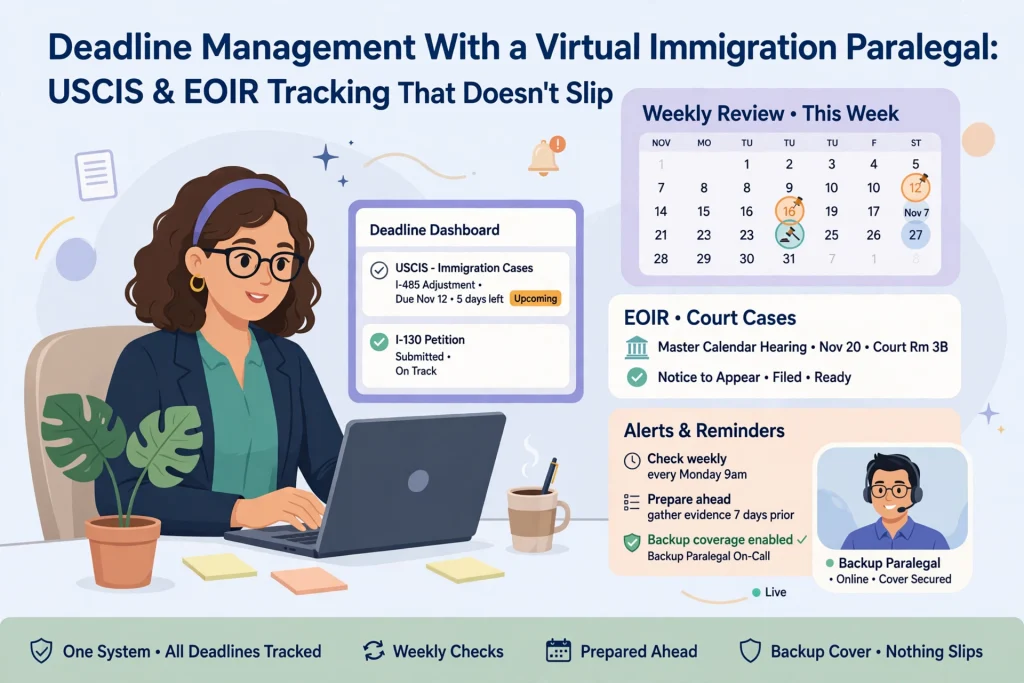
This guide is for the attorney or practice manager running that kind of docket. When you are handling USCIS filings and EOIR hearings at the same time, you want to know, without checking three places, what is due, who owns it, and what happens if that person is away, so you can decide on cases instead of chasing dates. The system below answers that job directly: one master calendar, separate USCIS and EOIR tracking, advance reminders, a daily check, and backup cover.
Two calendars, one master view
USCIS and EOIR are not the same calendar, and treating them as if they were is the first mistake to fix.
USCIS work runs on filing receipts, edition dates, biometrics appointments, and case status checks. A date in a USCIS case is usually tied to a receipt notice, a form edition, or a notice that sets a response window, and the clock often starts when USCIS issues the notice, not when the firm opens the envelope. EOIR work runs on court dates, hearing calendars, and filing deadlines tied to the court. A date in an EOIR case is tied to a specific court, a specific case, and often to a judge’s order or scheduling order. The two systems use different notices, different filing methods, and different ways of counting time.
Firms that handle both need two tracking disciplines inside one master view. Every date is tagged by system, so a USCIS deadline is never confused with an EOIR hearing, and a hearing date is never treated like a filing receipt date.
| System | What sets the date | What is tracked |
|---|---|---|
| USCIS | Receipt notice, form edition date, or notice setting a response window | Filing deadlines, RFE response windows, biometrics appointments, receipt and status check dates, priority date milestones |
| EOIR | Court notice, hearing notice, or judge’s scheduling order | Hearing dates, court filing deadlines, notice dates, preparation checklists tied to each hearing |
A practical test helps. Pick any date on the calendar and ask three questions. Which system set it, USCIS or EOIR? What notice or order set it, and where is that notice filed? Who owns the next step? If any answer requires a search through email, a spreadsheet, and someone’s memory, the calendar is not yet a system. It is a list.
Why deadlines slip
Deadlines slip for three reasons, and each one has a different fix. Naming the cause matters, because a better spreadsheet does not fix a missing owner, and a faster reminder does not fix a missing backup.
The first cause is ownership. A date lives in a shared spreadsheet, in an email thread, and in one person’s head. Everyone assumes someone else is watching it. No one is named as the owner, and no one is named to check the owner. When the date moves, the update reaches one of those places and not the others. The fix is a named owner for every date, and a named checker for the dates that matter most. Ownership is not a job title. It is a name, attached to a date, with a next step written down.
The second cause is timing. The reminder arrives on the day itself, or the day before, when there is no longer time to gather evidence, get an attorney decision, or fix a missing document. A day-of reminder is a warning that you are already late to prepare. The fix is advance reminders at 30 days, 14 days, and 3 days. At 30 days, the question is whether everything needed is in hand. At 14 days, the question is what is still missing. At 3 days, the question is only whether the filing is ready to go.
The third cause is absence. The owner is on holiday, ill, or on leave, and no one else is watching the same calendar. A date that falls during that absence is not missed on purpose. It is missed because the calendar went quiet. The fix is backup cover that is planned before the absence, with a named backup who monitors the same master calendar and the same daily check. Holiday cover is planned, not hoped for.
A fourth pattern sits behind all three. A date moves, and the move is not caught the day it moves. A notice arrives, a hearing is rescheduled, a status check shows a transfer, and the calendar still shows the old date. The fix is the daily check, covered below, and a rule that every new notice is entered on the calendar the day it is seen, with the old date kept visible as superseded, not deleted. A calendar that deletes old dates hides its own history, and a firm that cannot see what changed cannot check that the change was caught.
The master calendar system
A working deadline system has five parts. Each part is simple on its own. Together, they are what stops a date from depending on one person’s memory.
One master calendar holds every case and every date in one place. Not a spreadsheet plus someone’s memory plus a sticky note. Not one calendar for USCIS, a second for EOIR, and a third in email. One view, with each date tagged by system, case, and next step. When a new notice arrives, it goes on the master calendar first, before it goes anywhere else. If a notice is discussed in a meeting before it is calendared, the discussion can end with everyone agreeing the date is important and no one entering it.
A named owner is attached to every date. The owner is the person responsible for that deadline, and the owner knows what the next step is. For the most important dates, a second person is named to check the owner. The checker does not do the work. The checker confirms, at the reminder points, that the work is moving. In a virtual paralegal model, the paralegal can be the owner for administrative tracking, while the attorney remains the decision maker on the case.
Advance reminders run at 30 days, 14 days, and 3 days, not on the day itself. A useful reminder says what is due, what is ready, what is missing, and who needs to decide. If a reminder cannot answer those four points, the tracking entry is incomplete, and the reminder is the moment to complete it.
A daily check reviews new notices, receipts, and status changes every business day. It asks what arrived, what moved, what is new, and what needs an attorney decision today. A moved date caught on the day it moves is a routine update. A moved date caught a week later is a rush.
Backup cover is named in advance. When the owner is away, a named backup monitors the same calendar, runs the same daily check, and sends the same reminders. The backup does not need to learn the system during the absence, because the backup has been the checker or has covered the calendar before.
What the paralegal tracks, day to day
Day to day tracking is administrative, repetitive, and easy to skip when the office is busy. That is exactly why it needs a named owner and a daily check, rather than good intentions.
On the USCIS side, the paralegal tracks receipt numbers and case status checks, and flags anything unusual: a case that appears stuck beyond normal processing times, a notice that never arrived, or a transfer to another service center. The paralegal does not decide what the unusual pattern means for the case. The paralegal flags it, with the receipt number, the last status, and the date of the last check, so the attorney can decide quickly. The same tracking covers biometrics appointments and form edition dates, so an appointment is not discovered from a client call, and a filing is not prepared on an outdated form.
The paralegal also tracks Visa Bulletin movement and priority dates, so the firm knows the moment a case becomes current. A priority date is generally the date an immigrant visa petition was properly filed, or, where a labor certification is required, the date that application was accepted for processing. The monthly Visa Bulletin shows when a priority date is current for filing or for final action. Tracking means checking the bulletin when it is published, comparing it with the priority dates on the docket, and flagging the cases that have become current. A case that becomes current and sits unnoticed loses time, even though no date is lost.
On the EOIR side, the paralegal tracks hearing dates and court filing cutoffs, with preparation checklists tied to each hearing. A hearing date on its own is not enough. The entry needs the court, the case, the type of hearing, the filing cutoff that runs from that hearing, and the checklist that leads up to it. When a hearing moves, the checklist moves with it, and the old date stays visible as superseded. Representation before EOIR stays with the attorney. The paralegal’s work is administrative tracking: calendars, notices, filing deadlines, and preparation checklists.
Across both systems, the attorney’s job is to decide on flagged cases, not to remember the dates themselves. An attorney who spends the morning remembering dates is not spending it on legal judgment. A paralegal who tracks dates without flagging problems for decision is maintaining a list, not running a system.
The RFE clock
A Request for Evidence, or RFE, is a good test of a deadline system, because the clock is set by the notice and the window is fixed.
When an RFE arrives, the first step is to calendar the date on the notice itself. The date printed on the notice controls. Do not calculate a deadline from the day the envelope was opened, and do not assume a standard window applies to every case. USCIS rules cap the RFE response period at 12 weeks for most forms, and the officer can set a shorter period. Some forms have a shorter maximum. USCIS does not grant extensions to an RFE response period. If the response is not received by the date on the notice, USCIS can decide the case on the record as it stands.
The tracking entry for an RFE needs more than a due date. It needs the notice date, the receipt number, the form, the evidence requested, the date USCIS must receive the response, and the mailing or filing method that will get it there in time. The reminders at 30, 14, and 3 days then have real content: at 30 days, is the evidence list complete and assigned? At 14 days, what is still missing? At 3 days, is the packet assembled and ready to file? The paralegal assembles requested documentation and organizes the exhibit packet according to attorney specifications. The attorney decides what evidence proves the point and approves the response.
An illustrative example shows why advance reminders matter. Suppose a notice sets a response date 8 weeks out. The entry is made the day the notice is seen. The 30 day reminder falls about 4 weeks into the window, which is when missing evidence should already be chased, not first requested. The 14 day reminder is the last point at which a missing document can realistically be obtained and checked without a rush. The 3 day reminder is a readiness check, not a starting point. No real case, date, or client is described in this example.
The EOIR clock
EOIR deadlines work differently, and the difference is why separate tracking matters.
Many EOIR filing deadlines count backward from a hearing date, in calendar days, and a filing counts only when the court receives it. Mailing a filing is not filing it. A deadline that falls on a weekend or legal holiday generally moves to the next day the court is open, but the specific order in the case controls. Always use the date in the notice or order for that case, rather than applying a general rule from memory.
The EOIR Immigration Court Practice Manual sets default starting points that illustrate the pattern. Filings in advance of a master calendar hearing are generally due 15 days before the hearing when a ruling is requested. Filings in advance of an individual hearing are generally due 30 days before the hearing. Responses are generally due 10 days after the other side’s filing is received by the court. Those are defaults. A judge can set different deadlines in a specific case, and the judge’s order controls. New policy and scheduling orders can also change the default track for a case, which is why the tracking entry must record the source of the date, and why it must be updated when a new order arrives.
The practical lesson is the same as with an RFE: calendar from the source document, tag the entry by court and case, run the reminders backward from the hearing, and keep the preparation checklist tied to the hearing date so that a moved hearing moves the checklist too. If a hearing is vacated or rescheduled, the old entry stays visible as superseded, the new entry is created from the new notice, and the attorney is flagged the same day.
Backup cover that actually works
Backup cover fails when it is informal. A colleague knows the system in general, but does not know which dates fall during the absence, and does not have access to the same calendar view. The cover that works is named, dated, and handed over in writing.
Before an absence, the owner and the backup walk through the dates in the window together. They confirm the owner for each date, the checker for each date, and the next step for each case. They confirm access to the calendar, to the notices, and to the client contact details needed for reminders. They agree how flagged cases will reach the attorney during the absence, and what the backup should escalate immediately rather than hold until the owner returns. The handover note is short. It lists the dates, the owners, the missing items, and the decisions waiting.
During the absence, the backup runs the same daily check and the same reminders. The calendar does not go quiet. After the absence, the owner and the backup walk through what moved, what was filed, and what was flagged, so nothing that happened during the cover period is lost in the handover back. With SMY, backup cover is part of the model, as stated in the original draft. Ask any provider about backup cover before you sign, not after a date is missed. Ask who the named backup is, how the handover works, and what happens if both the owner and the backup are away at the same time.
What the attorney keeps, and what the paralegal does
A virtual paralegal model only works when the line between administrative tracking and legal judgment stays clear.
The paralegal tracks, flags, assembles, and organizes. That includes intake, form drafting under attorney direction, evidence packets, RFE response drafting and assembly according to attorney specifications, and deadline tracking for USCIS and EOIR dates. SMY paralegals complete the AILA Paralegals Online Course curriculum, as stated on the live SMY service page, and come prepared with working knowledge of USCIS filing standards, document requirements, and case management. That training is a baseline for the work, not a substitute for attorney supervision.
The attorney decides, signs, and represents. All paralegal tasks are performed under the direct direction and supervision of the licensed attorney of record. Paralegals do not provide legal advice, do not establish attorney-client relationships, and do not represent clients before EOIR. The attorney decides what evidence proves a point, approves filings, and decides on flagged cases. The paralegal’s flagging step exists so those decisions happen early, with the full picture, rather than late, under time pressure.
That division also protects the firm. A calendar entry that says a date is owned by a paralegal, checked by a second person, and decided by the attorney is auditable. When a client asks what happened with a deadline, the firm should be able to show the notice, the entry, the reminders, the flag, and the decision, in order.
How to judge a deadline system, before you rely on it
Whether a firm is hiring a virtual paralegal, reorganizing an in-house docket, or fixing its own calendar, the same questions reveal whether a system is real.
Ask who owns each date, by name, and who checks the owner. Ask how reminders are set, and whether they run at 30, 14, and 3 days with content, not only a date. Ask how the daily check works, and what happens when a notice arrives after hours or on a Friday. Ask how USCIS dates and EOIR dates are tagged separately, and how a moved date is entered without losing the old date. Ask how backup cover is named, handed over, and handed back. Ask how an RFE clock is started, from which document, and how the receipt date is confirmed. Ask how a hearing cutoff is counted, from which order, and who confirms the judge’s order controls. Ask what the attorney sees each morning, and how flagged cases reach the attorney the same day.
Listen for concrete answers. A real system can name the owner, show a sample entry, and describe a handover. A vague system talks about being careful, being experienced, or checking regularly, without naming who, when, or how. Care and experience matter, but they are not a substitute for a calendar with an owner, a reminder, a daily check, and a backup.
Frequently asked questions
What is the most common deadline mistake?
Tracking from memory, or from a single spreadsheet no one owns. The fix is not a better spreadsheet. It is a named owner, advance reminders, and a daily check. Add separate USCIS and EOIR tagging, and backup cover, and the three most common causes are covered.
How does backup cover work for deadlines?
A named backup monitors the same master calendar during holidays, illness, or leave. With SMY, backup cover is part of the model. Ask any provider about this before you sign, not after a date is missed. Ask who the backup is, how the handover works, and how flagged cases reach the attorney during the absence.
Can a virtual paralegal really track EOIR dates?
Yes, for administrative tracking: calendars, notices, filing deadlines, and preparation checklists. Representation before EOIR stays with the attorney. The paralegal flags changes and upcoming cutoffs so the attorney can decide and act. The judge’s order in the specific case controls the deadline.
What date controls an RFE deadline?
The date printed on the notice controls. Do not calculate a deadline from the day the envelope was opened, and do not assume a standard window applies to every case. The response period is capped at 12 weeks for most forms, can be shorter for some forms, and USCIS does not grant extensions. Calendar the notice date the day the notice is seen, and confirm how USCIS must receive the response.
What happens if a hearing date moves?
The new date is entered from the new notice or order the day it is seen, the old date stays visible as superseded, the preparation checklist moves with the new date, and the attorney is flagged the same day. Do not delete the old entry, and do not rely on the date in an old email thread. The source document for the new date is the record that matters.
The bottom line: deadlines do not slip because firms do not care. They slip because no one owned the calendar, the reminder came too late, or the owner was away with no backup. A trained virtual paralegal with a master calendar, separate USCIS and EOIR tracking, advance reminders, a daily check, and backup cover fixes all three, and keeps the attorney deciding cases instead of remembering dates.
See how deadline support fits your docket on our Immigration Paralegals page, or book a free session. SMY Solutions, Brooklyn, NY, (929) 327-5878.

Comments (0)
No comments yet. Be the first to share your thoughts.