

Why a Content Calendar is a Game-Changer
Ever find yourself staring at your screen, wondering what to post today? That’s where a content calendar saves the day. It’s not just about posting consistently—it’s about creating a roadmap that takes your audience from awareness to conversion.
What is a Content Calendar?
A content calendar is your marketing playbook. It maps out what to post, where, and when. Instead of scrambling for ideas, you always know what’s next.
Why Businesses Struggle Without a Calendar
Without a plan, businesses fall into the trap of posting randomly. This leads to:
- Missed opportunities
- Poor engagement
- Inconsistent brand voice
- Lost sales potential
Benefits of a Content Calendar That Drives Conversions
- Consistency: Stay visible in front of your audience.
- Strategic Planning: Content aligns with business goals.
- Better Engagement: Build trust through regular interaction.
- Measurable Results: Track what works and double down.
Key Elements of a High-Converting Content Calendar
- Audience Insights – Know what your audience actually wants.
- Content Themes & Pillars – Stick to 3-4 core topics.
- Goals & KPIs – Align content with measurable outcomes.
- Distribution Channels – Email, social media, blogs, or all three.
The Psychology Behind Content That Converts
Content that taps into emotions, urgency, and trust converts better. For example: a story that shows real client success builds far more trust than a random tip.
Tools to Use for Building Your Content Calendar
- Trello or Asana for planning
- Google Sheets for simple tracking
- Canva for design templates
- Buffer or Later for scheduling
Step-by-Step Guide to Creating a 30-Day Content Calendar
- Decide content types (blogs, videos, carousels, emails).
- Define your goals (awareness, engagement, leads, or sales).
- Map content pillars (education, engagement, authority, conversion).
- Assign posting days.
- Add calls-to-action that push toward your business goals.
Sample 30-Day Content Calendar Breakdown
Week 1: Awareness – Brand story, team intro, industry tips.
Week 2: Engagement – Polls, quizzes, relatable content.
Week 3: Authority & Trust – Case studies, testimonials, thought leadership.
Week 4: Conversion – Promotions, limited-time offers, lead magnets.
Example Content Ideas for Each Week

- Awareness Post: “Here’s why we started our business…”
- Engagement Post: Instagram poll asking followers about challenges.
- Authority Post: “5 Proven Strategies That Helped Our Clients Grow Sales.”
- Conversion Post: Free consultation offer with urgency.
The Role of CTAs in Your Calendar
Every post should guide your audience to the next step: subscribe, download, book, or buy.
Common Mistakes in Content Calendars & How to Avoid Them
- Posting only sales content
- Ignoring data insights
- Not repurposing content
- Forgetting to add CTAs
How a 7-Day Content Calendar Can Jumpstart Your Strategy
Not ready for 30 days? Start small. A 7-day calendar helps you test content types and audience response before committing to a full plan.
Example 7-Day Content Calendar for Beginners
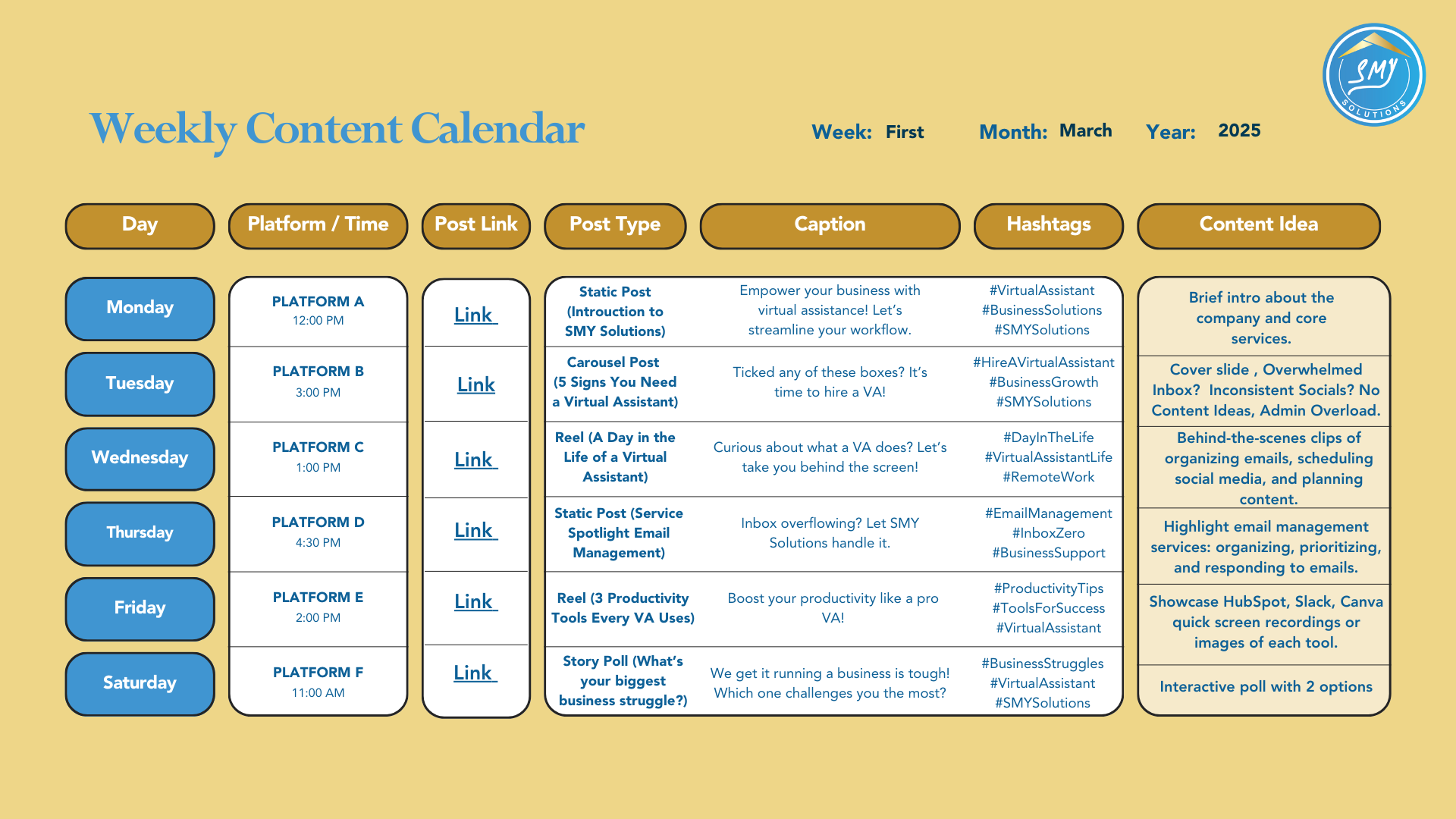
- Day 1: Brand Intro (Awareness)
- Day 2: Quick Tip (Educational)
- Day 3: Client Testimonial (Authority)
- Day 4: Poll or Question (Engagement)
- Day 5: Behind-the-Scenes Post (Trust)
- Day 6: Value Post (Checklist or Guide)
- Day 7: Soft Promotion with CTA (Conversion)
Tracking and Measuring Success
Use analytics to measure likes, shares, clicks, conversions, and adjust accordingly.
How Virtual Assistants Can Manage Your Content Calendar: SMY Solutions Perspective
Creating and managing a content calendar is time-consuming. Virtual Assistants from SMY Solutions can:
- Plan and schedule posts
- Research content ideas
- Create graphics
- Track engagement and optimize strategy
This frees professionals to focus on sales, strategy, and growth while VAs handle execution.
Conclusion
A content calendar isn’t just about organization—it’s about driving results. Whether you start with a 7-day trial calendar or dive into a 30-day plan, the key is consistency, strategy, and smart execution. And with support from VAs, you’ll never miss a post or a conversion opportunity.
FAQs
1. How detailed should my content calendar be?
Include dates, platforms, content type, and CTA at a minimum.
2. Should I plan content monthly or weekly?
Start with weekly, then expand to monthly for better consistency.
3. Can I reuse old content in a new calendar?
Yes—repurpose top-performing posts with fresh angles.
4. Do I need a VA to manage my content calendar?
Not mandatory, but a VA saves time and ensures consistency.
5. How soon will I see results from a content calendar?
With consistent posting and smart CTAs, results typically show within 30–60 days.